
Campus Workflow Automation
Immokalee Technical College (iTECH), Collier County Public Schools. 2022–present. Built with Microsoft Forms, Power Automate, Power Apps, Excel, SharePoint and Teams Planner: the only tools available to me.
The problem
In 2020, applying to iTECH meant filling out a PDF. It asked for a Social Security number, criminal history, residency details and emergency contacts, and its only submit option was an email button at the top. Younger applicants couldn’t figure it out. Neither could my own kid.
Nothing tracked what happened after a form arrived. There were no numbers on how many people applied, how many we lost, or how long anyone waited to hear back.
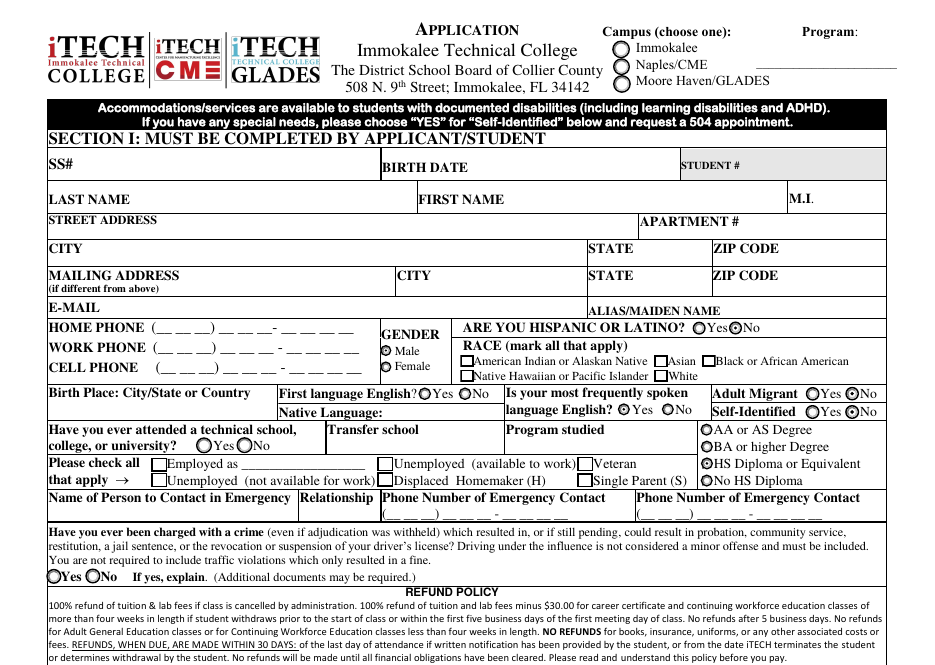
Administration asked our web design specialist to “go paperless.” She’s a visual artist, and she was trying to write Java code to solve it when she came to me.
The decision I lost
My first answer was that we shouldn’t build our own. Our sister college already had an application system. I wanted to adopt it, and work with them to make it better for students, advisors and administration.
Administration didn’t want to, because of differences in philosophy, culture and institutional guidance between the two colleges. I argued for it, and I lost. I’ve since come to agree with that decision.
That left a narrow set of tools. I had no database and no access to the student information system. What I did have was the district’s Microsoft 365 license. My supervisor approved it as a three-month stopgap.
How I built it
I spent about a month in summer 2022 on it, and most of that month was spent with the people who would use it, not building.
I started from the advisors’ form, not a blank page. Advisors at iTECH run every intake conversation from the Academic Advisement Form (AAF). It was designed on paper long before I arrived, it covers what our accreditor (the Council on Occupational Education) requires, and it’s how advisors decide whether a student qualifies for a program or needs remediation first. If the new system didn’t produce that form, advisors wouldn’t use it.
So every application now generates one. Each applicant gets their own workbook, filed in a SharePoint folder under their name and date of birth. It contains:
- the AAF, pre-filled from the application, with the program’s prerequisites, basic-skills exit scores, total hours and approximate cost looked up automatically from a program table;
- the residency statement, media release, information release, SSN disclosure and rules of conduct that used to be separate paper forms.
Students tested it before launch. The early versions were held together with popsicle sticks and bubble gum, and I put them in front of students before anything went live.
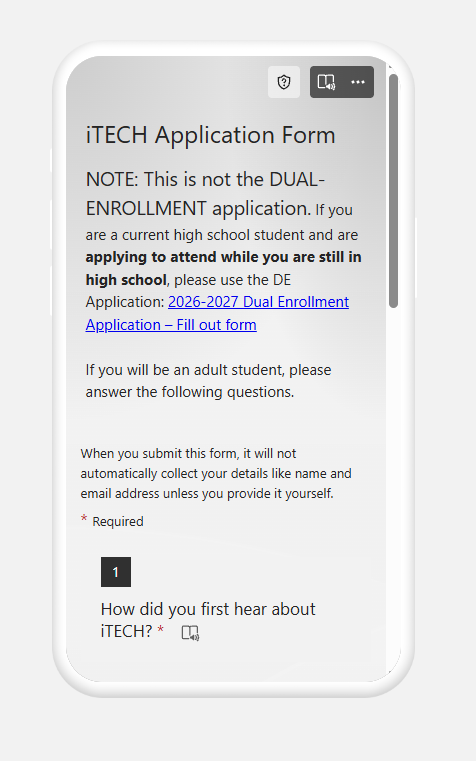
What happens when a student applies
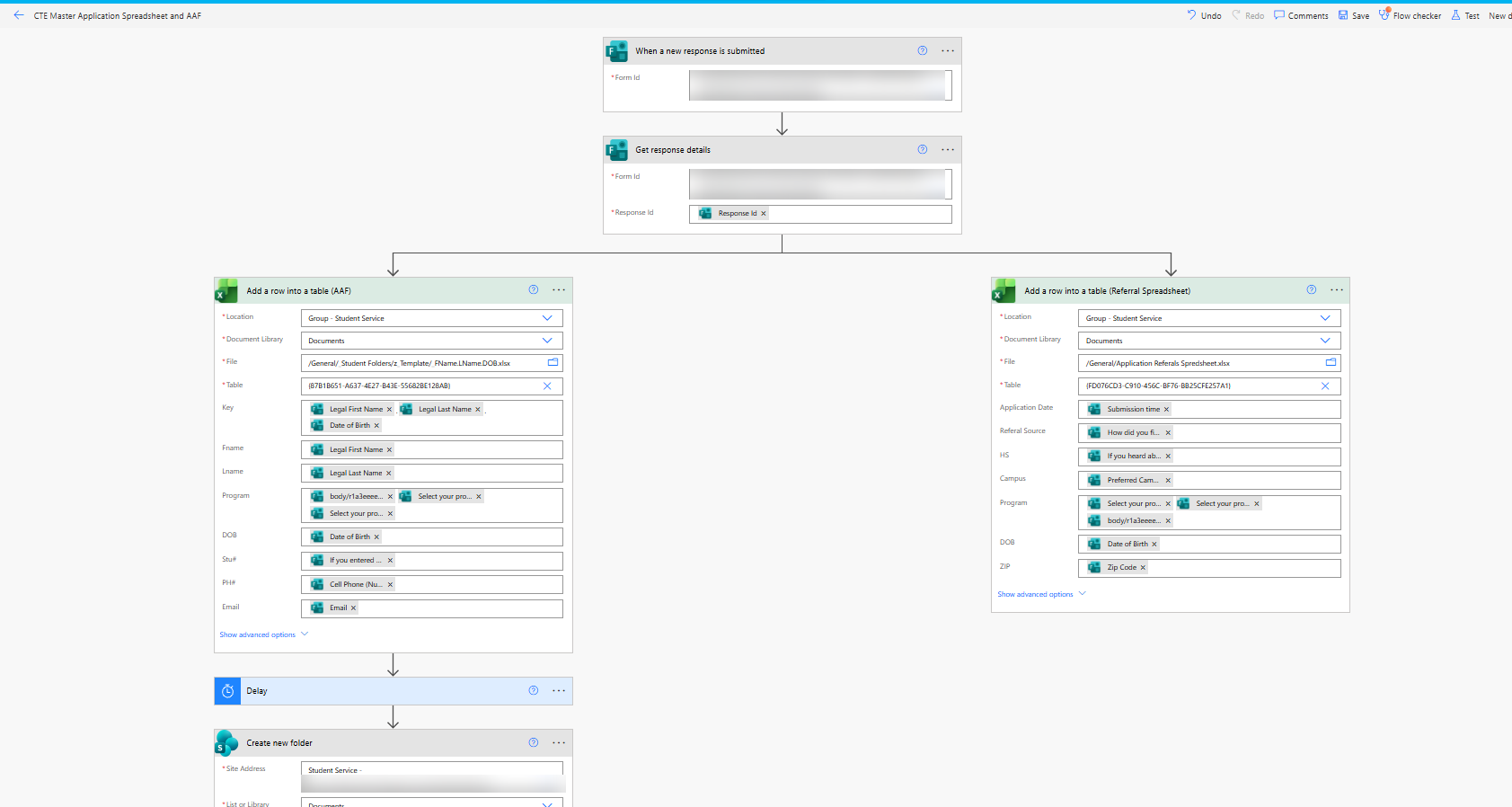
- The answers are recorded twice. Once into the student’s AAF, and once into a referral spreadsheet that tracks how applicants heard about iTECH, their high school, campus, program and ZIP code, for recruitment planning.
- A student folder is created in SharePoint, and the filled-in workbook is moved into it.
- The flow branches by campus. Each campus has its own master spreadsheet and its own confirmation email with the right next steps and contacts.
- A Planner card is created in the bucket for the student’s program, tagged with what’s still outstanding, such as the application fee or the learning-styles and career-interest surveys. Staff work from that board.

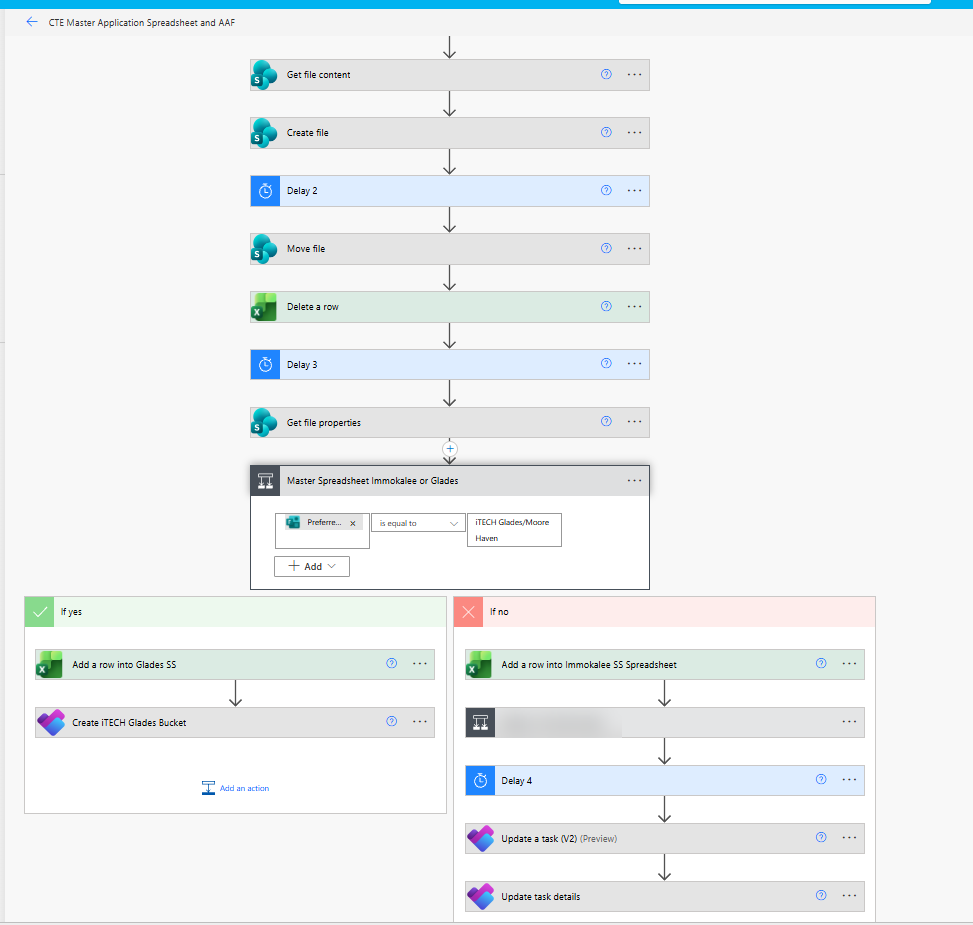
Some answers on the application carry legal, compliance or reporting requirements, or tell us a student may need support. Those trigger notifications to the staff responsible. One more rule waives the $40 application fee for students who applied at a recruitment event.
Results
- Live since summer 2022. More than 4,000 applicants have come through it, at a college of about 750 full-time-equivalent students including dual enrollment and walk-ins.
- Every application is accounted for. Each one has a folder, a pre-filled AAF and a card on the advisors’ board, so nothing sits in an inbox.
- Very few incidents. It’s been stable enough that it rarely needs attention.
- The same approach scaled to testing. The testing center app below handled 1,814 exams in the last year.
The limits
I’d rather be honest about these than oversell it.
- It doesn’t talk to the student information system. Staff still enter accepted students into the SIS by hand.
- The confirmation email still tells students to come in person. I don’t like that step.
- I’m the only person who knows how it works. I’ve written documentation, but nobody has asked to learn it. To reduce the risk, I moved every flow and file into a second staff member’s account so the system wouldn’t depend on mine. When that colleague resigned, I learned about it late and had to move everything again on short notice. It’s still an open risk, and it’s the strongest argument for the integrated system I wanted in the first place.
Nursing admissions
When iTECH was approved for a Professional Nursing (LPN-to-RN) diploma, we had less than a month to build an application and evaluate candidates for a small first class. Nursing is the most requested path on campus, so the problem wasn’t going to be finding applicants. It was finding the ones who were ready.
So the application front-loads the work. Before anyone is evaluated, applicants have to:
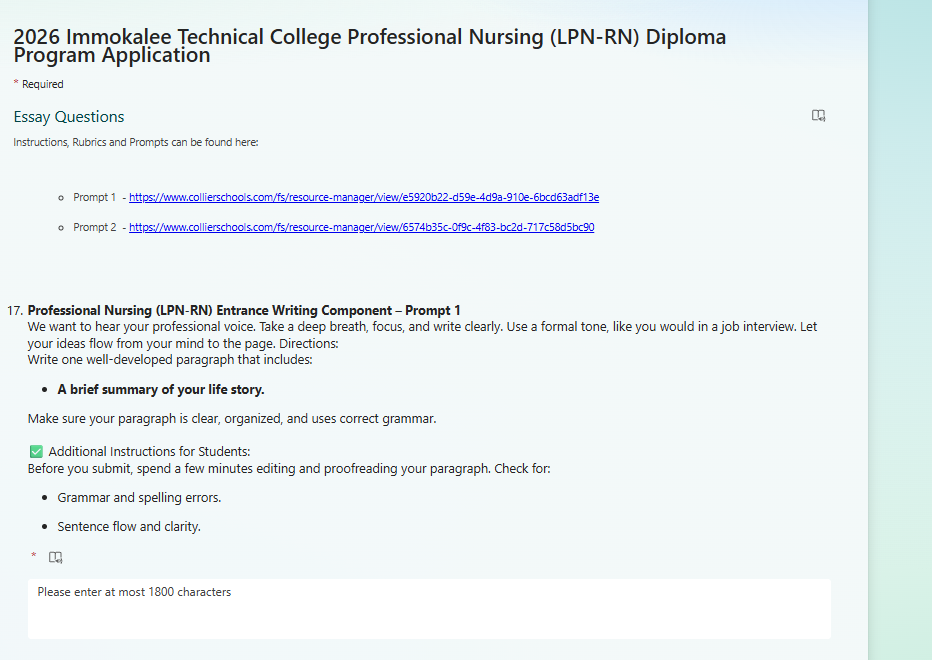
- Write two short essays in the form: a summary of their life story, and their opinion on the state of healthcare in their community. Each is one paragraph, 1,800 characters at most, written in a professional voice.
- Submit their documents using a required file-naming convention: Practical Nursing transcript, high school or GED transcript, current BLS card and IV therapy certificate.
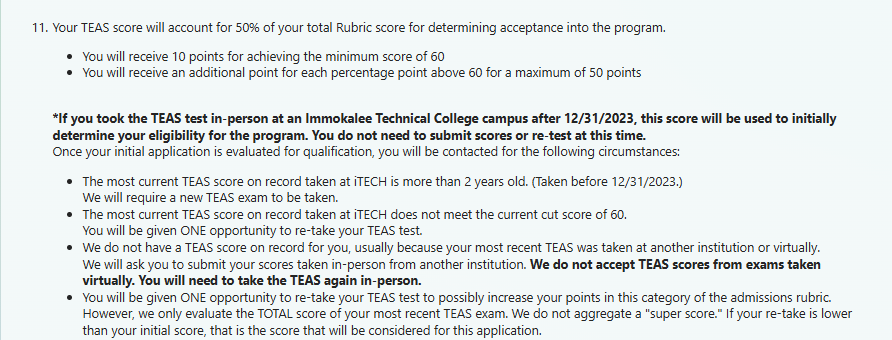
- Agree to the TEAS rules up front. The nursing entrance exam counts for half the rubric. Scores must come from an in-person exam taken after December 31, 2023, applicants get one retake, and there’s no “super score.”
Each completed application is scored on a 100-point rubric:
| Element | Points |
|---|---|
| TEAS composite (10 for the minimum score of 60, plus 1 per point above, up to 50) | 50 |
| Essay 1 and Essay 2 | 20 |
| Practical Nursing GPA (90–100% earns 10, 80–89% earns 5) | 10 |
| Interview | 10 |
| Employer recommendation | 5 |
| Practical Nursing instructor recommendation | 5 |
A paperwork check (LPN license verified, both transcripts, BLS, IV therapy) has to be complete, and a pre-interview score is calculated before the interview round.
The first round drew 30 applicants for 12 seats, each of whom had completed the essays and the TEAS.
Applying it to Practical Nursing
Later, when Practical Nursing enrollment came up short, one suggestion at a leadership meeting was more social media posts. I pointed out that applications were already high and the problem was converting applicants into students. At the next meeting I presented the Practical Nursing data: it draws far more applications than any other program. I proposed giving it an application modeled on the RN process, and collecting readiness data with an ATI practice test. It’s being considered for the spring 2027 Practical Nursing cohort.
Testing center and certification reporting
I also run iTECH’s testing center, which delivers Pearson VUE, Certiport and Prometric certification exams along with entrance and basic-skills tests. We administered 1,814 exams in the last year. I built its scheduling and reporting with the same tools.
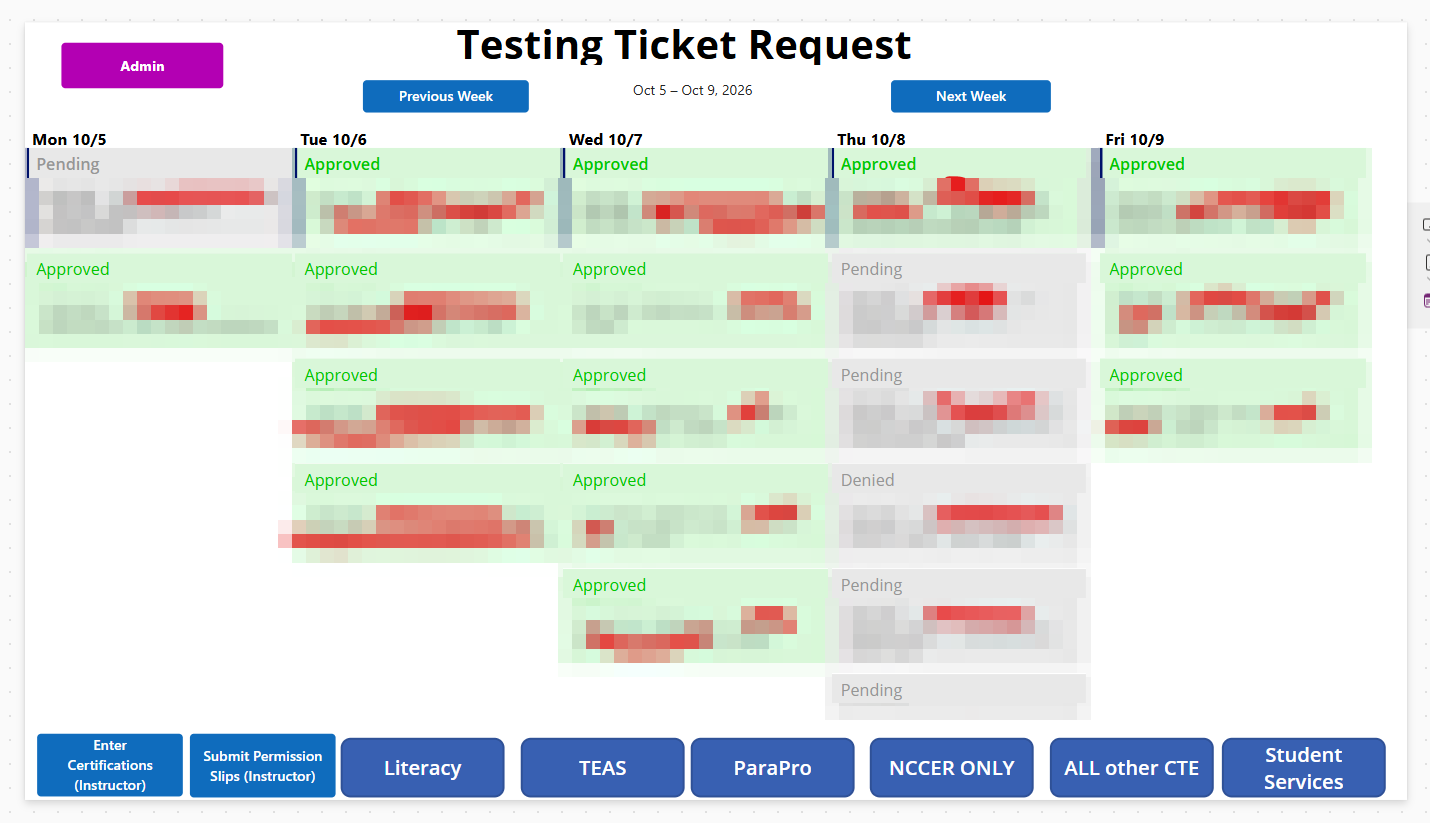
Scheduling app (Power Apps). Instructors request exam sessions through a weekly calendar, with separate request paths for each kind of test: basic-skills literacy, TEAS, ParaPro, NCCER construction credentials, all other CTE certifications, and student services. Each request shows as pending, approved or denied, and the proctor approves it in the same app.
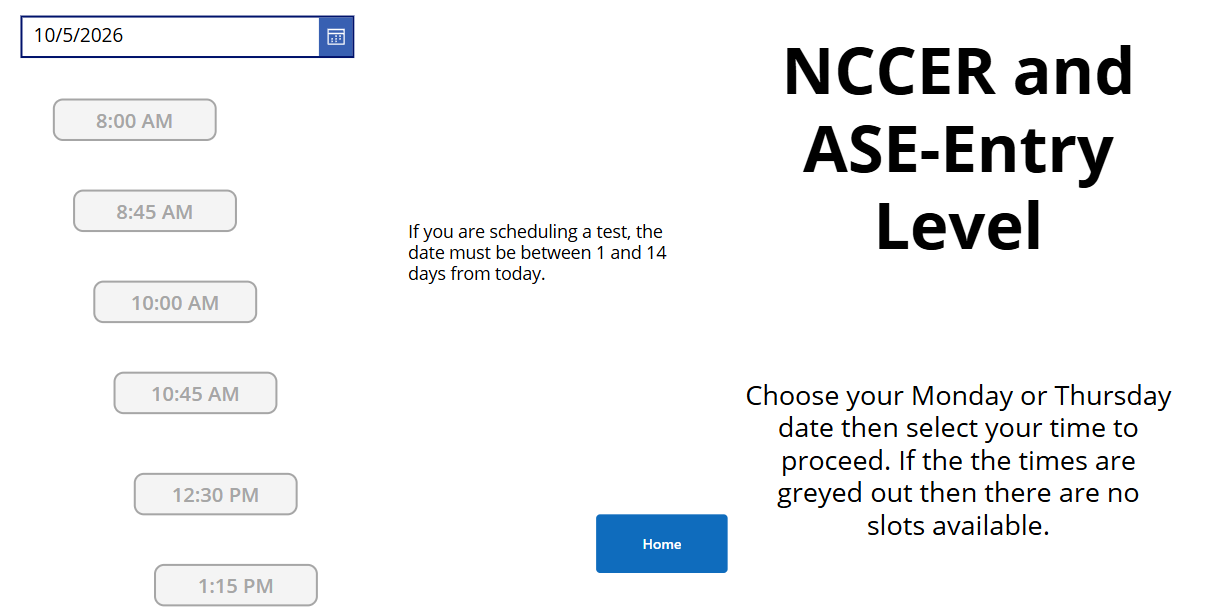
The booking screens enforce the testing center’s rules so the proctor doesn’t have to. NCCER and entry-level ASE exams, for example, can only be booked on Mondays or Thursdays, between 1 and 14 days out, and a time slot greys out once it’s full.
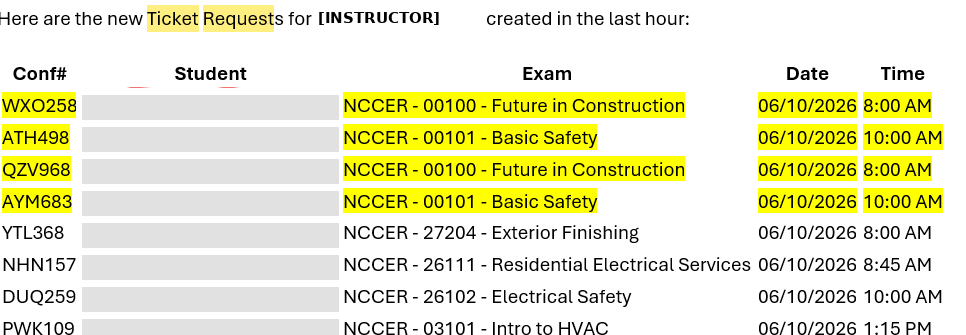
Batch requests. Construction often schedules many module exams at once. Instead of an email per student, the instructor receives one summary of all new requests from the last hour, each with a confirmation number.
Certification reporting. When a student earns a certification, the result goes to everyone who needs it: district CTE staff, our data entry staff (with the certificate attached), the instructor, the student, and the district-required notice to parents. The records also cover what the district’s required test-monitoring report asks for, including attempt numbers, days between attempts, and a proctor who isn’t the student’s instructor.
What I learned
- Ask and listen before building. The design came from the advisors’ existing form, not from me.
- Constraints shape the design. Forms, Power Automate and Planner weren’t what I would have chosen, but everything runs on the district’s existing Microsoft 365 license.
- A “temporary” system needs the same care as a permanent one. This one was built to last three months and is still running.
- Ownership is part of the design. A system one person understands is a risk, no matter how well it runs.
This write-up was drafted with AI assistance from my notes, files and screenshots. The system, its design and the decisions described here are mine.