
IT Support Certification Diagnostic
Take the diagnostic » · Source on GitHub · Scoring method and weights
The problem
Every student in my program goes through a foundations stage before choosing a specialty, and I want every one of them to leave with at least one certification. Exam fees are hard for my students to pay, and many of them struggle with the large, multi-domain CompTIA exams. So I build toward those with smaller, single-subject exams that students can actually pass.
Two of those early exams are Cisco Certified Support Technician (CCST) IT Support and IT Specialist: Device Configuration and Management. When I laid their published objectives side by side, about half the content was shared: hardware and ports, Active Directory and Group Policy basics, MFA, malware response, Windows updates and settings, Task Manager, Event Viewer and Device Manager, and basic connectivity commands. The rest pulls in different directions:
- CCST IT Support is broad help desk work: ticket queues and SLAs, documentation, macOS and mobile devices, printers, DHCP and IPv6 addressing, and working with users.
- Device Configuration and Management goes deep on Windows administration: file systems and partition styles, share vs. NTFS permissions, Group Policy precedence, UAC, and recovery.
Most of my students will take both. The question is which one a particular student should take first, and that depends on their background more than on which exam looks harder on paper.
What I built
A 50-question diagnostic on the same engine as my AI and Networking diagnostics. The two exams’ objectives are mapped onto eleven topics. Shared topics count toward both readiness scores, and the topics only one exam tests are what decide the recommendation. A student gets a readiness score for each exam, the one to take first, and a study plan ordered by how many points each weak topic is worth.
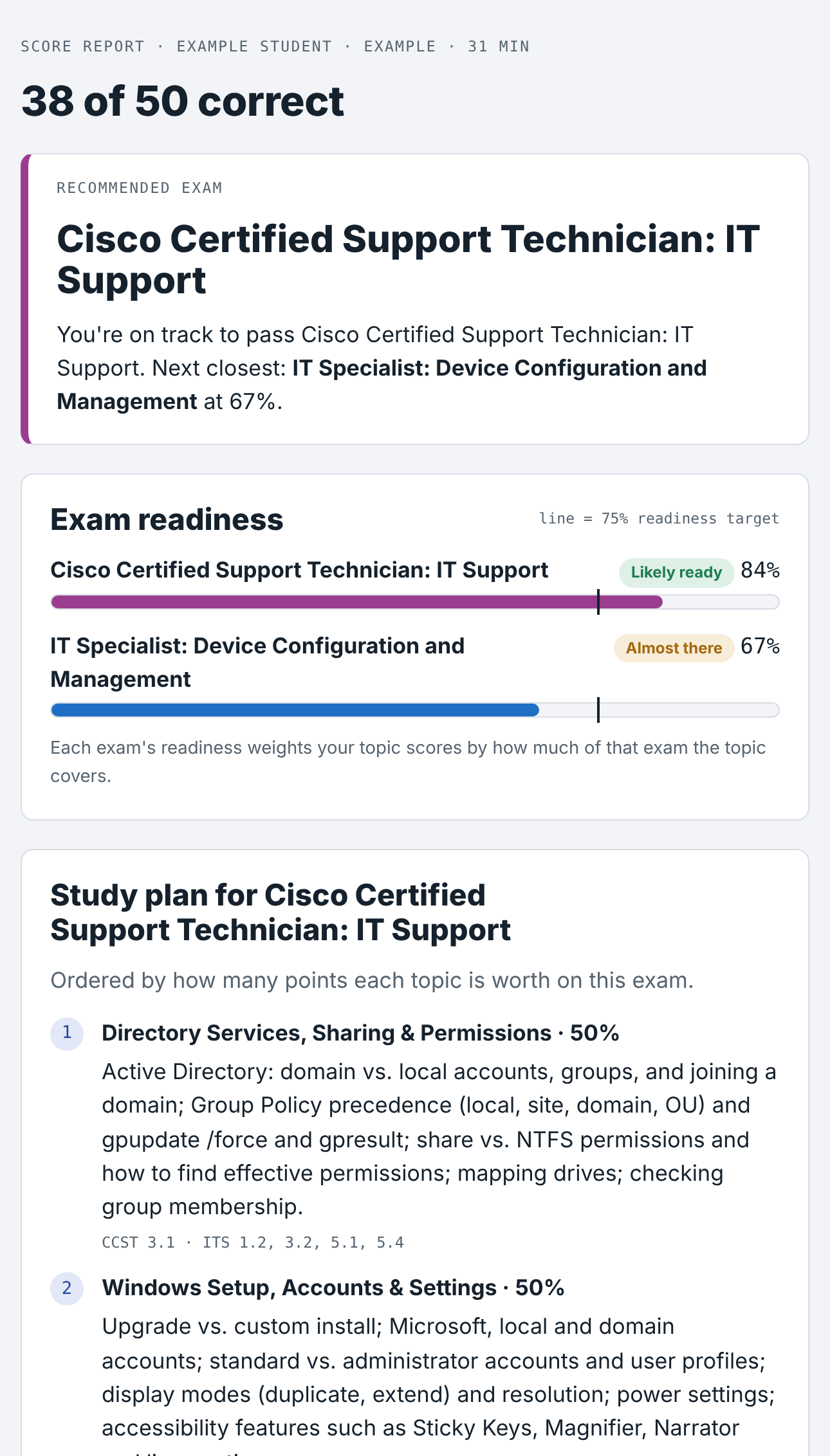
Neither vendor publishes domain percentages, so the weights are estimates from the breadth of each exam’s objectives. Every topic lists the objective numbers it covers, so the study plan points students straight back to the official objectives.
Letting my class’s results decide where the questions lean
My students had already taken GMetrix practice tests for both exams: 82 questions on CCST IT Support (up to 39 students) and 120 on Device Configuration and Management (up to 8). The CCST results showed a clear pattern:
- Connectivity and Resource Access was the weakest domain (66%). Within it, the weakest questions were on security vs. distribution groups (46%), an external drive not being recognized (45%), and the protocol used to map network drives (55%).
- Hardware issues (65%) were close behind, including reading Device Manager status icons (45%).
- Threats (78%) and documentation (85%) were the strongest.
The Device Configuration group is small, but it points the same way: troubleshooting, file-sharing permissions and backup were weakest, and security was strongest.
So the diagnostic gives fewer questions to security and more to directory groups and permissions, hardware and peripherals, and Windows troubleshooting. I also adjusted the CCST weights to match how the GMetrix bank spreads its questions, with about a quarter on hardware and peripherals.
How I use it
- Placement: given at the start of the foundations stage, it shows which adult students already have enough Windows or help desk experience to move faster.
- Sequencing: it tells each student which exam to schedule first, and the study plan says what to review before they spend money on a voucher.
- Planning my teaching: the Teacher view shows class topic averages and the most-missed questions, so I know which shared topics to reteach for everyone and which belong in the help desk or Windows-administration branch.
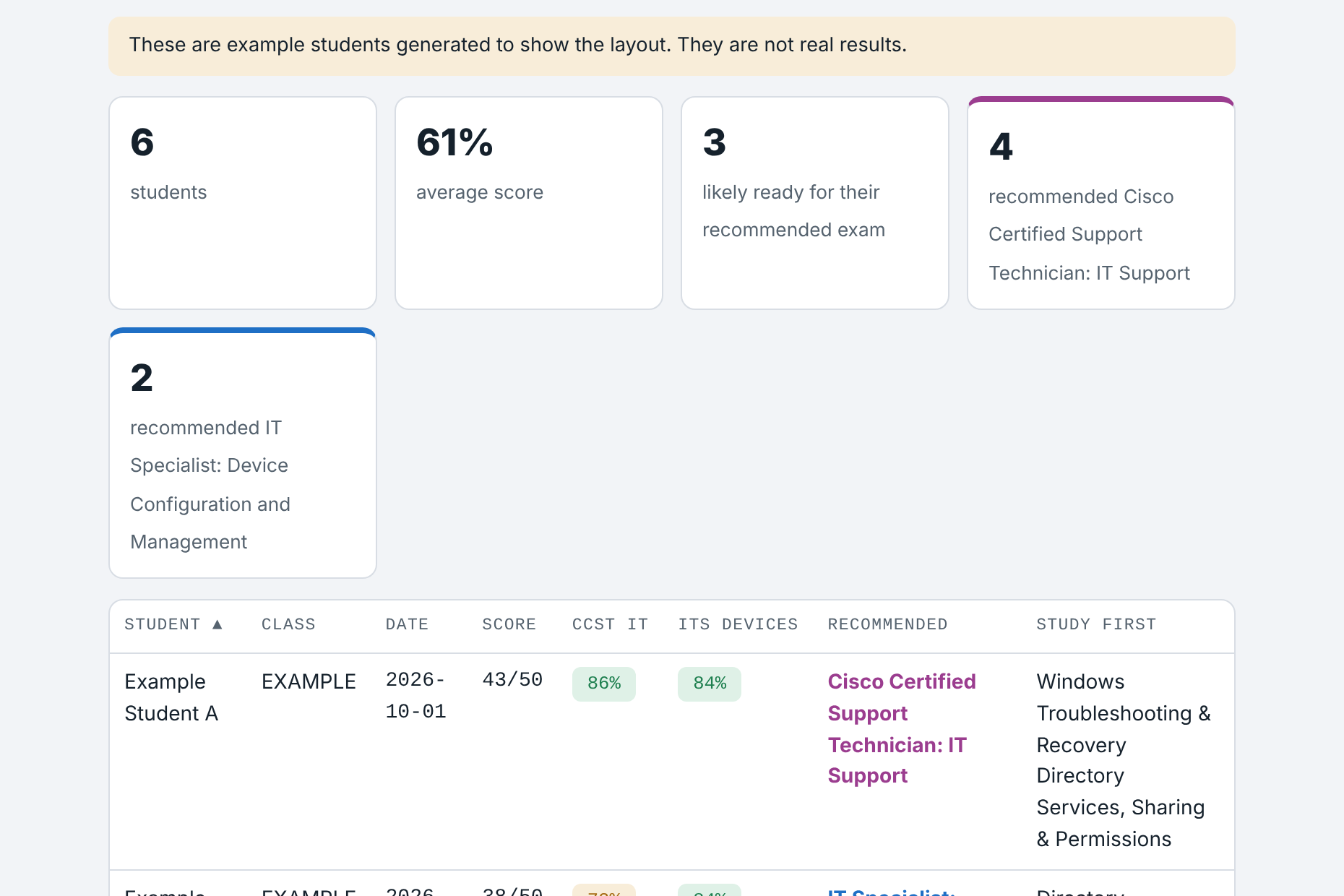 The Teacher view, filled with built-in example data.
As with the other diagnostics, the engine and documentation are open source. The question bank lives in a private repository, and the published test keeps its answer keys encoded. Graded attempts go through the Canvas version.
What’s next
Comparing students’ diagnostic results with their real exam scores, to tune the weights and the 75% “likely ready” line. After that comes a version for single exams with many domains, like CompTIA Tech+.
Built with AI assistance against my specification. The choice of exams, the goal of using it to decide which exam each student takes first, using my class’s GMetrix results to decide where the questions lean, and the decisions about format and keeping the bank private are mine. The comparison of the two exams’ objectives, the questions, explanations, weights draft, software and this write-up were produced with AI assistance from the vendors’ published objectives.
Not affiliated with or endorsed by Cisco, Pearson, or Certiport. Exam names are trademarks of their owners.